 RelayDM
An Instagram automated behavior warning is a reason to stop and investigate, not to rotate accounts or increase delays until detection disappears. The warning alone may not explain the precise cause. Preserve the official notice and inspect authorized access, recent activity and connected tools before making further automated requests.
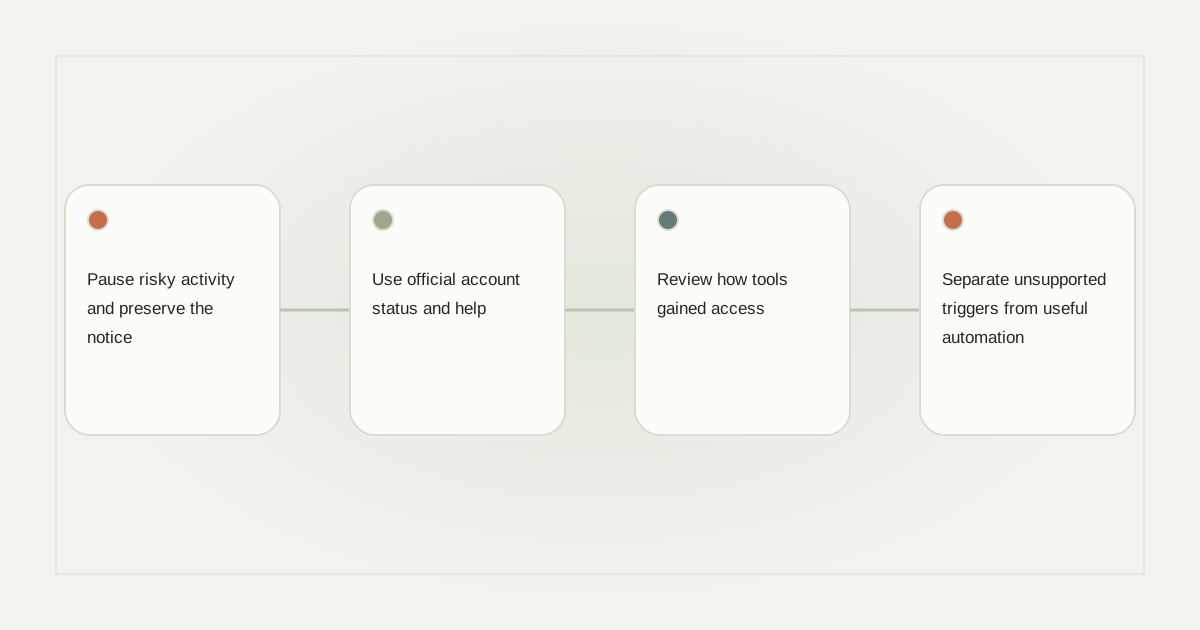
Pause risky activity and preserve the notice
Stop the campaign or tool that may be involved, using its supported pause controls. Do not repeatedly test whether the restriction has gone away by sending messages or performing more account actions. Record the notice wording and time without publishing private account details.
If a business relies on several integrations, keep an inventory rather than disconnecting randomly. Note which tool handles comments, which handles scheduling and which handles inbox support. That context helps distinguish an account-access problem from an individual campaign failure.
Use official account status and help
Open Instagram through its normal application or official website and review the available account notices and recovery instructions. Follow the process shown for the actual account. Do not assume a third-party blog can diagnose the warning from one screenshot or promise an exact recovery time.
Questions such as “what happens when Instagram detects automated behavior” do not have one universal operational answer. Restrictions can vary with the notice and account context. Avoid anyone offering a guaranteed bypass in exchange for login credentials, a session cookie or a payment.
Review how tools gained access
Inspect connected applications and remove access you no longer recognize through the official account controls. A legitimate business integration should explain its permissions and ownership. Password-sharing scripts and unofficial session automation introduce different risks from an authorized API connection.
Do not copy access tokens into a diagnostic form supplied by a stranger. If you suspect compromise, use the platform’s official security and recovery steps. A tool’s polished interface or claim to send an Instagram automated welcome message does not establish that its access method is appropriate.
Separate unsupported triggers from useful automation
An Instagram automated DM from comment can be a requested workflow when the platform and account permit it. An Instagram automated DM to new followers is a different trigger and must not be assumed available merely because a comment workflow exists. Review the actual documented capability.
Likewise, a keyword automated DM should only act on the intended rule and recipient. Remove campaigns that attempt unsolicited bulk outreach or scrape people into a messaging list. Slowing an unsupported operation does not make it supported, and a follower count is not consent to contact.
Restart only after the cause is understood
Ask the tool provider for safe evidence: account association, event identifiers, sending status and relevant error categories. Keep exact credentials and message contents out of public reports. If the cause remains uncertain, preserve the pause rather than replacing the account and repeating the same activity.
RelayDM should not be represented as protection from platform enforcement. Its general customer sending remains gated, and preparing an automation does not override account restrictions. Resume only a verified, eligible workflow with clear stop controls after the account’s official instructions have been addressed.
For containment, see turning off auto replies. For the difference between a supported request and unrestricted outreach, read Instagram DM limits. Review product restrictions separately.
Sources and editorial notes
Source review: November 1, 2026. This is research-based guidance, not an independent hands-on test of every product. Prices and permissions can change.
Read our methodology, product-availability policy and corrections process.