
Quick answer
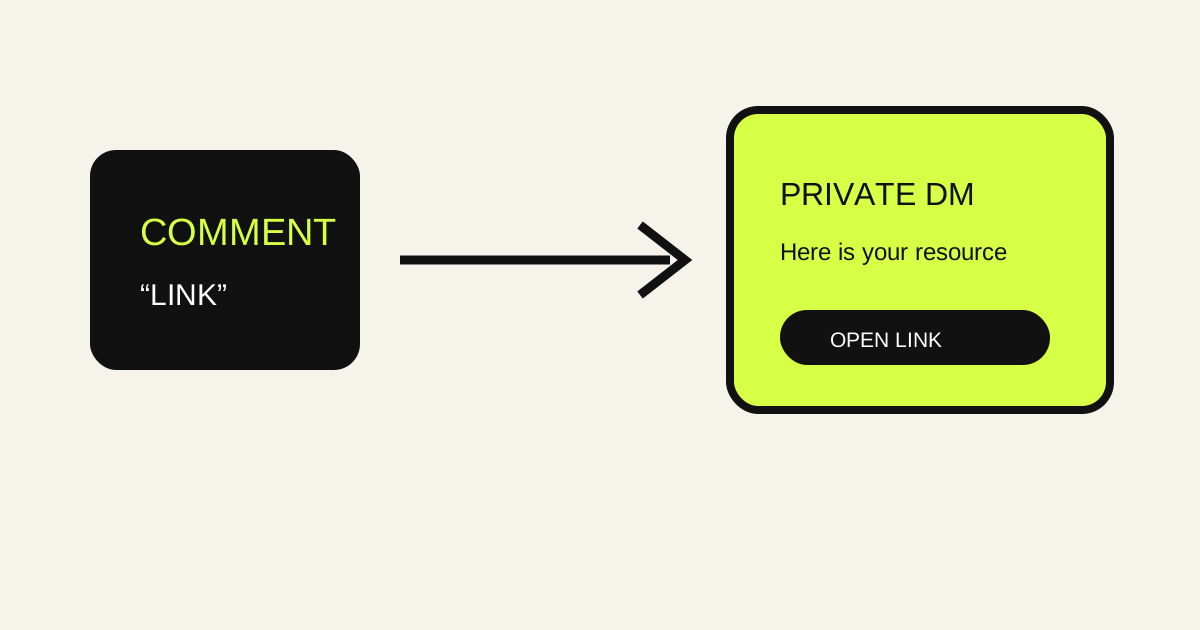
To automatically send a link when someone comments on Instagram, create a comment automation for the intended post or Reel, match a clear phrase such as LINK or GUIDE, write a private opening message, and add the destination as an ordered Link delivery item. The journey is: comment → trigger and keyword match → private DM → link button. RelayDM can also support a public acknowledgement, Fast or Interactive / Gated delivery, lead capture and measured click activity when those options are configured. The current product overview shows the supported model.
Why comment LINK works
A ‘comment LINK’ prompt gives a post one clear response to recognize. Someone who wants the promised page can use the phrase, and the automation can route that request into a private conversation instead of making the person search a profile or wait for a manual reply. The phrase is a routing signal, not proof of intent beyond that request. Keep the post, keyword, opening message and destination aligned so the response feels like the next step in one conversation.
The comment-to-link journey
The useful sequence has five boundaries. The person comments on the selected Instagram post or Reel. RelayDM checks the automation’s target and matching rules. The private response is attempted. The configured Link item supplies the destination and button label. The resulting delivery or click event can be reviewed where tracking is enabled. A match is not the same as provider acceptance, and a click is not a purchase. Keep each claim tied to the event that was actually observed.
Target the right content
Attach the automation to the post or Reel that makes the link promise. A menu link belongs with a post that invites menu requests; a guide link belongs with the post that introduces the guide. Every-comment matching can work for a narrowly focused post, while keyword matching gives more control on a busy one. Test a matching comment on the target and a non-matching comment elsewhere. This prevents a comment-triggered link from appearing in an unrelated conversation.
Choose an Instagram comment keyword
LINK is obvious, but GUIDE, SHOP, MENU, DETAILS or a short phrase may fit a more specific post. Choose words people can type accurately and explain the expected phrase in the post. Add alternatives only when they represent the same request. Use exclusions for terms that should not start the workflow. Case-insensitive matching can reduce avoidable misses, but it does not understand a sentence’s meaning. Avoid ambiguous words that appear naturally in unrelated comments.
Write the initial private message
The opening DM should connect the comment with the link. ‘Thanks for asking—reply LINK and I’ll send the menu’ is clear when a continuation response is configured. If the selected Fast workflow delivers immediately, say that plainly instead. Do not claim that the destination has already been opened or that the message was accepted before the provider confirms it. Read the recipient preview and check that the phrase, link promise and next step match the saved automation.
Configure the Link delivery item
RelayDM’s current ordered Delivery Content model supports Text, Link and PDF items. Add a Link item when the destination should be delivered as a button in the private journey. Write the message above the button so the recipient knows what it opens. Give the button a descriptive label such as Open the guide or View the menu. The configured destination and attribution stay attached to the Link item when content is reordered; do not paste a raw tracking URL into the message.
Use Text before the link when context helps
A link is easier to use when the recipient knows what it contains. Place a short Text item first when the destination needs an explanation, an instruction or a note about what to expect. Avoid repeating the entire caption. A concise sentence can tell someone whether the link opens a guide, details page or resource hub. If the request is already obvious and the destination is self-explanatory, a single Link item may be the cleaner sequence.
Primary and Secondary terminology
Some current RelayDM analytics and audience views use Primary and Secondary link terminology. Preserve that product language when inspecting the data. It describes configured link activity in the current reporting model; it should not be rewritten into a claim about revenue or message opens. If the automation has more than one destination, make their purpose and order clear in the builder. Keep the link selected in the item and the button label understandable to the recipient.
Fast Delivery for a direct link
Fast Delivery is usually the shortest path for a simple comment-triggered link. The matched event proceeds through the configured delivery content without adding an unnecessary qualification step. Use it when the post has already explained the offer and the recipient only needs the promised destination. Check the complete preview, link label and destination before activation. Fast does not mean guaranteed: provider rules, account state, recipient context and delivery responses still determine the operational result.
Interactive / Gated link journeys
Interactive / Gated delivery is useful when the link should follow a continuation response, optional follow verification or lead capture. Explain why the extra step exists and what the person receives afterward. Follow verification is an optional configured workflow, not a universal requirement. A false or unknown result should remain gated rather than being presented as access. Do not add a gate to a straightforward link merely because the UI offers one; friction should solve a real qualification or collection need.
Email capture before delivery
A link journey can include a configured email or email-plus-name capture when the resource exchange needs a contact detail. Tell the person what they will receive and what happens next. Ask only for information the workflow uses, and keep the question separate from the destination’s promise. A captured lead is a recorded response, not proof that the link was clicked or that a purchase occurred. Review the Leads view and your own follow-up practices before activating this path.
Tracking what the link can tell you
A configured tracked Link can connect a destination with observed click activity and automation context. That helps answer whether the link received measured interaction and which journey supplied it. RelayDM reporting can filter known crawler or prefetch activity in Qualified Clicks views, but the event remains a click signal. It does not prove that a person read the DM, completed a checkout or became a customer. Use the narrowest accurate interpretation when reviewing Analytics.
Creator examples
A creator might ask people to comment GUIDE on a tutorial Reel and send a checklist page, or ask MENU on a cooking post and send a prepared recipe collection. These are hypothetical examples, not customer results. In each case, the post names one destination, the keyword represents one request and the private message makes the link easy to open. Keep a human reply available for questions that the destination cannot answer.
Business and product examples
A business might invite DETAILS on a product post and deliver a product-information page, or ask SHOP and send a category page. Keep changing information on the destination current. Do not promise stock, shipping, pricing or availability unless the linked page and operating process support those claims. Public acknowledgement can be concise; the private Link item can provide the deeper information. Unusual orders and sensitive support questions still need a person.
Prevent wrong or broken destinations
Treat the destination as part of the campaign copy. Open it before activation, check the mobile experience, verify redirects and confirm that the page answers the question asked in the post. Avoid shortening a URL in a way that hides its purpose from the team. Give the item a stable internal name and review it after reordering content. A technically successful DM with the wrong destination is still a failed experience, so test the actual button rather than trusting the field alone.
Avoid spammy experiences
One clear request should produce one clear path. Do not trigger the same link journey from a collection of unrelated keywords, send several promotional destinations when someone asked for one, or write a public reply that exposes a private address. Keep the opening message brief and make the resource relevant. If comments reveal a different question, narrow the rule or answer manually. Automation should remove repetitive routing, not make the comment section feel like a sequence of advertisements.
Common mistakes
The usual mistakes are a mismatch between the post’s phrase and the saved keyword, a target attached to the wrong Reel, a missing exclusion, a button label that hides the destination, and a Link item placed before the Text that explains it. Teams also confuse a provider send attempt with an accepted message and a click with a conversion. Review matching, copy, item order, destination and recorded outcome as separate checkpoints.
Provider boundaries
RelayDM sends through the connected professional account and supported provider context. Account authorization, recipient context, timing and provider responses can affect whether the public or private attempt succeeds. Do not ask for an Instagram password, invent a native capability or promise that every commenter will receive a link. The current FAQ is the right place to confirm supported delivery and measurement boundaries before writing campaign copy.
A setup checklist
Confirm the connected account and target post or Reel. Choose every-comment or keyword matching deliberately, then add exclusions. Write the public acknowledgement separately from the private opening. Decide whether Fast or Interactive / Gated is appropriate. Add Text before the Link when context helps, choose a descriptive button label and test the destination on mobile. Review the workflow overview and compare plan context without turning either page into a delivery guarantee.
Link-delivery FAQ
Can a comment automatically send a link? It can start a configured private journey when the event matches and delivery is supported. Can the link appear in a public comment? The current RelayDM model centers the configured private delivery; any public acknowledgement is a separate configured outcome. Can I collect an email first? Yes, where the selected gated journey supports that step. Does a click prove a sale? No. It is an observed tracked interaction with clear limits.
Practical takeaway
To automatically send a link when someone comments on Instagram, make the promise specific, match the request carefully and configure the destination as an ordered Link item in the private journey. Test the actual post, phrase, message, button and mobile destination. Choose Fast when direct delivery is enough; use Interactive / Gated only when the extra response, optional check or lead capture has a clear purpose. For the wider automation context, read the Instagram DM automation guide and return to the RelayDM Resources library for related workflows.
→START / ROUTE
Explore link delivery
See the supported RelayDM workflow and decide whether it fits your next Instagram conversation.