 RelayDM
Instagram product-link automation should help a shopper reach the right product information. It should not guess a variant, promise stock the store cannot confirm or treat a DM click as a completed order. The destination page remains responsible for current commercial terms and the actual checkout.
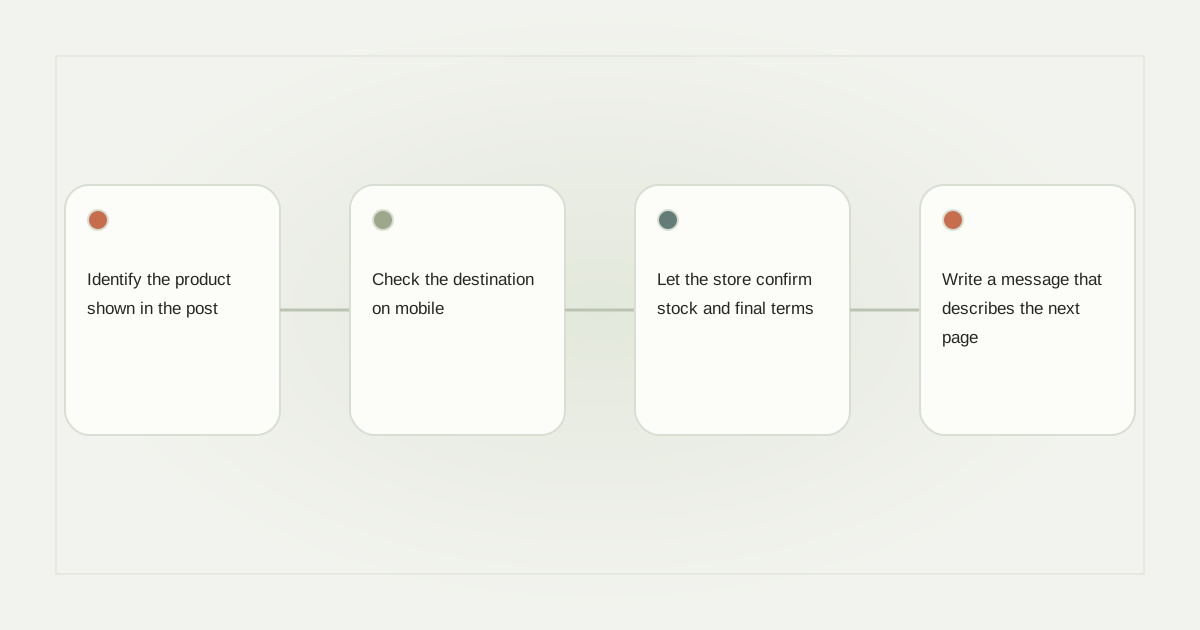
Identify the product shown in the post
Record which item, collection or variant the Reel actually presents. A video showing a green medium tote should not quietly open an unrelated default variant because a link was copied from another campaign. If several products appear, use a clear selection page.
Keep a product reference beside the automation configuration. The person maintaining the store should be able to identify the intended destination without watching the whole Reel again. This small record helps prevent copy-and-paste errors when a creator publishes similar products.
Check the destination on mobile
Open the complete URL, including campaign parameters, from a phone. Verify the product name, images, available choices and price presentation. Make sure the page does not bounce through an unexpected domain or require an unknown application to view basic information.
HTTPS is useful transport protection, not proof that a shop is genuine. Use an owned or otherwise verified business destination and keep account administration secure. Do not place payment credentials, access tokens or private recipient information inside a link.
Let the store confirm stock and final terms
Inventory and pricing can change after a message is written. Prefer a stable product page that shows current information rather than a DM that hardcodes claims such as “only two left” without a reliable source and update process.
If the message quotes a price, give the campaign an owner and review process. Clarify exclusions, shipping or other material conditions where relevant to the offer. A general disclaimer is not a substitute for correcting a known wrong product or price.
Write a message that describes the next page
An example is “Here is the tote shown in the Reel. Choose your preferred size and color on the product page.” A supported button labeled “View tote options” tells the recipient what to expect. Do not use “Order confirmed” before an actual purchase.
If the item is sold out, offer an accurate status and an optional appropriate next step. Do not automatically substitute a different product and pretend it is the requested item. Keep the original request distinguishable from any later recommendation.
Test lifecycle changes before a large campaign
Check a renamed product, an unavailable variant, a discontinued item and a changed destination. If an owned short link is used, confirm that its redirect still points to the approved store page. Maintain a change record rather than editing an opaque redirect without review.
See coupon terms when the product link includes an offer, and conversion tracking before claiming sales. A click and a verified order are different events.
Keep delivery and commerce responsibilities separate
The messaging layer needs eligible recipients, qualified formats and duplicate protection. The store needs accurate product data and authoritative payment processing. Read comment-to-resource delivery and RelayDM’s current availability. This workflow does not enable gated customer sending, change a subscription or authorize a payment.
Sources and editorial notes
Source review: November 1, 2026. This is research-based guidance, not an independent hands-on test of every product. Prices and permissions can change.
Read our methodology, product-availability policy and corrections process.