 RelayDM
A useful Instagram keyword automation tool does more than notice a word. It should connect a clear invitation to the correct resource without replying to unrelated conversation. Start with a small rule you can explain, then test the cases that should remain silent. More keywords do not necessarily create a better campaign.
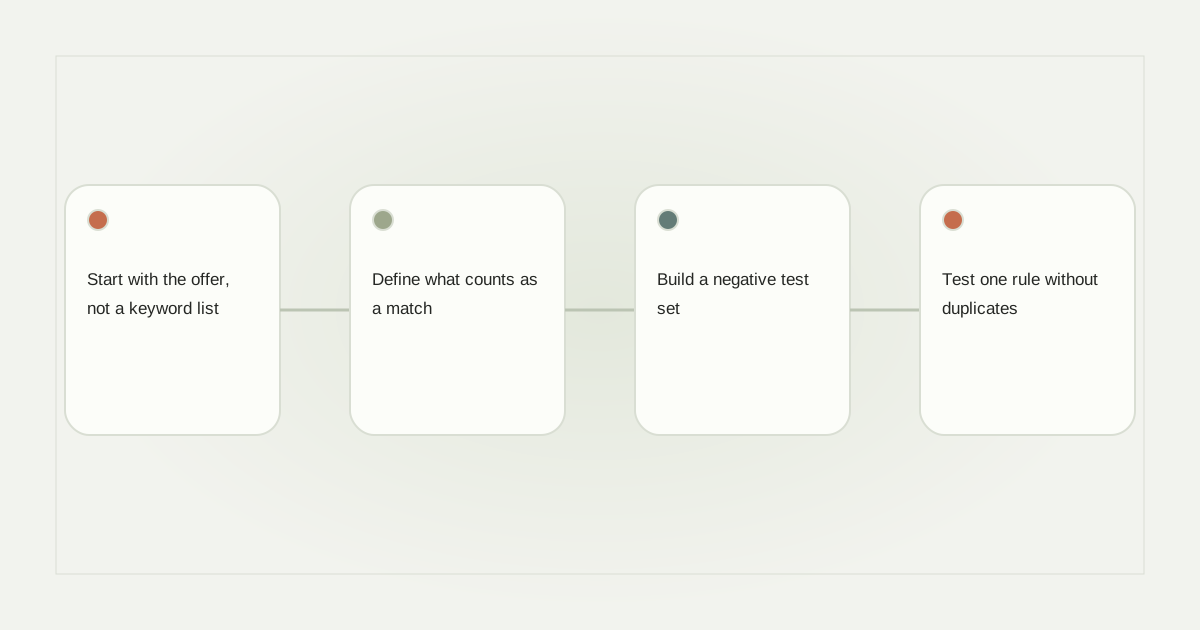
Start with the offer, not a keyword list
Suppose a furniture maker shares a Reel about measuring an awkward alcove. The resource is a printable measuring sheet. “Comment MEASURE for the sheet” establishes a narrower expectation than “Comment YES for more.” A later post about finishes should use a different invitation and destination, even if the audience overlaps.
Keep a simple record containing the post, account, requested phrase and destination. That record prevents a future editor from attaching an old keyword to a new offer. Review the full comment automation workflow separately; this guide concentrates on matching rules.
Define what counts as a match
Write a tiny acceptance table before opening the editor. For MEASURE, test “measure,” “MEASURE,” “Measure please,” an emoji beside the word, an unrelated sentence and a longer word containing the same letters. Specify whether a phrase inside a sentence should qualify. Do not assume every vendor interprets “exact” or “smart” identically.
Case normalization and Unicode normalization solve different problems. Case handling may equate uppercase and lowercase; Unicode normalization can make equivalent character representations comparable. Neither automatically handles every language, spelling variation or visual lookalike. Use the actual words your audience writes rather than promising universal language understanding.
Build a negative test set
A broad phrase such as “price” might appear in “That price is too high” or “Please stop sending price lists.” Those are not interchangeable requests. Include complaints, quoted keywords and requests to stop in your review. Where the product lacks exclusion rules, choose a more deliberate campaign phrase or route ambiguous comments to a human.
All-comments mode has a different meaning: it treats the post itself as the invitation. Make that invitation explicit in the caption, and avoid activating it on posts that invite sensitive experiences or general discussion. Silence can be the correct outcome.
Test one rule without duplicates
Use a controlled draft and review preview changes as you add or remove chips. Enter should add one value, a repeated value should not create two rules, and changing the selected post should not silently preserve the wrong association. Saving and reloading must retain the same normalized set.
Meta’s private-reply rules still govern what follows a match. A successful keyword match is not unlimited messaging permission. Your test should distinguish “matched,” “eligible for reply” and “message accepted,” rather than treating them as one event.
Keep the rule maintainable
After a campaign, inspect false matches and missed requests with their original context. Change one rule at a time and record why. Avoid adding every word from a successful post to a permanent global trigger. Retire a destination when its offer expires, and verify that duplicate events cannot repeat the same resource send.
Use comment-specific troubleshooting when the rule behaves unexpectedly. RelayDM drafts can help organize this configuration, but general customer sending remains gated. Review current availability before planning a live campaign.
Sources and editorial notes
Source review: November 1, 2026. This is research-based guidance, not an independent hands-on test of every product. Prices and permissions can change.
Read our methodology, product-availability policy and corrections process.